Task Cards#
A task card stores the action sequence for a LIBERO task and marks the key objects or locations needed by those actions. During replay, RPent finds their current coordinates in the camera images, updates the action coordinates, and executes the recorded actions in order.
This keeps planning and perception separate:
The task card decides what to do.
SAM3 or Molmo finds where to do it in the current scene.
The LIBERO toolkit executes the actions at the updated coordinates.
--planner task_card therefore does not call an LLM to make planning
decisions. Molmo is used only for visual localization: it points to a requested
object or location in a camera image so RPent can recover its current
coordinates.
Performance and execution time#
On the 200 LIBERO Object evaluations (20 tasks and 10 seeds per task), Task Card solved 179 episodes (89.5%), compared with 186 (93.0%) for Codex without reasoning. Its mean execution time was 40.9 seconds per episode, compared with 283.6 seconds for Codex.
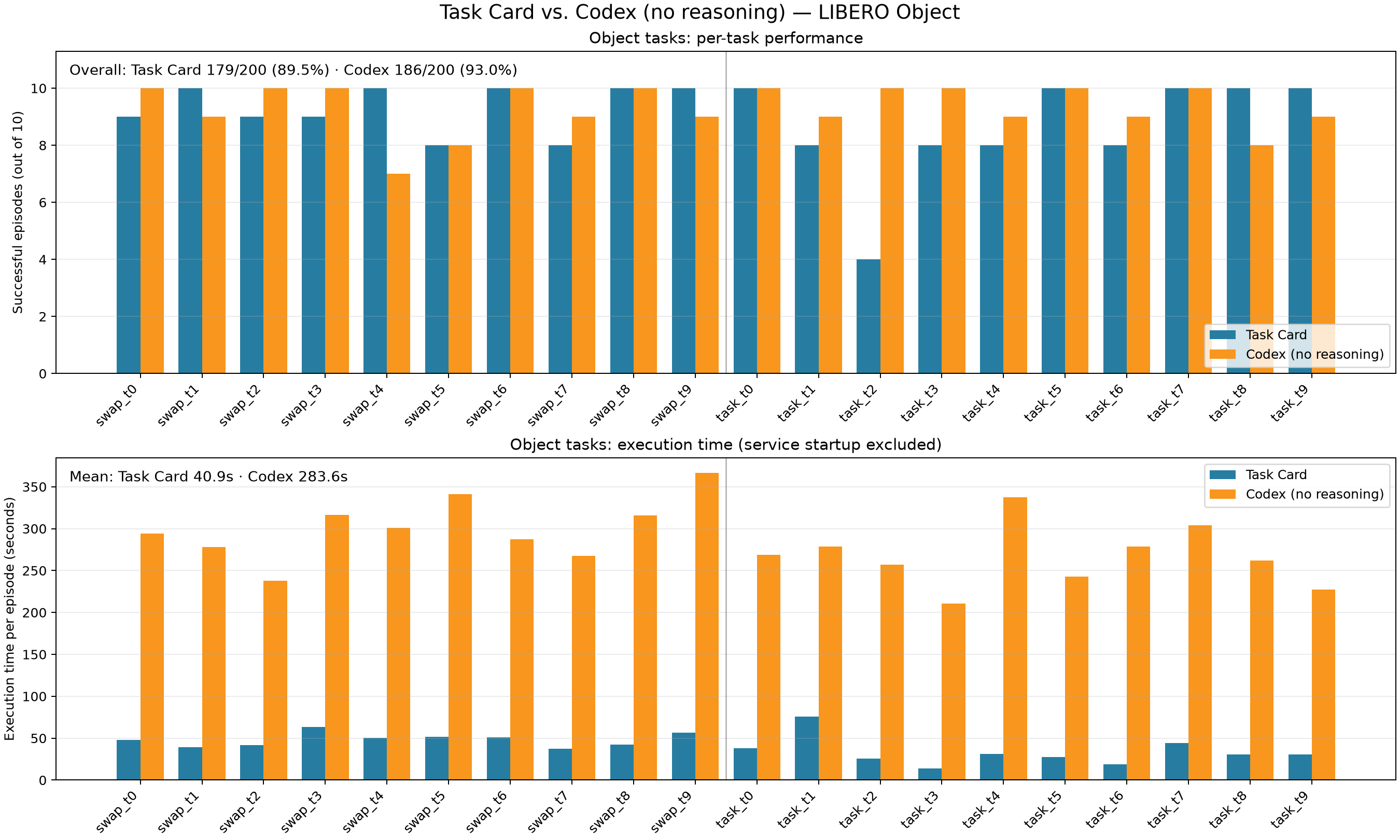
The timing excludes model and service startup. Codex time is the mean planner execution time over the 10 evaluated seeds for each task. The original 10-seed Task Card timing logs are no longer available, so its timing bars use the tool-execution time from the recorded episode underlying each final card (one timing sample per task). The success rates use the complete 200-episode evaluation in both cases.
How replay works#
Each card contains an action plan and a set of anchors. An anchor describes a task-relevant object or location, such as the object to pick or the destination for a placement. Actions that depend on an anchor store their offset from that anchor instead of relying only on an absolute coordinate.
At run time, RPent extracts the anchors required by the card and locates each one with the interface recorded for it:
SAM3 locates segmentation anchors and returns an object mask and its position.
Molmo locates point anchors by pointing to the requested object or location in the camera image.
RPent then combines each live anchor position with the offset stored in the card and executes the resulting waypoint. This lets the same card run when objects appear at different positions.
Task-card files#
Task cards are distributed through the RLinf/RPent-memory task-card directory
on Hugging Face rather than tracked in Git. RPent downloads them with the other
LIBERO memory and stores them locally under memory/libero/task_card.
There is one card for each supported task.
memory/libero/task_card/
  object_swap_t3_anchors.json   objects and locations to locate at run time
  object_swap_t3_plan.json      actions and their anchor-relative coordinates
The task selects the card. The seed changes the environment layout, not the card used for the task.
To download only the task cards manually, run:
hf download RLinf/RPent-memory --repo-type dataset \
  --include "libero/task_card/**" --local-dir memory
Run a task card#
Start Molmo first, then pass its endpoint to RPent:
rpent --robot libero --planner task_card \
  --suite libero_object_swap --task 3 --seed 0 \
  --molmo-endpoint http://127.0.0.1:20703
Task-card replay currently supports the libero_object_task and
libero_object_swap suites. Other LIBERO suites do not yet have task cards.
The VLA and SAM3 services use the normal LIBERO runtime configuration. You can
also connect to services that are already running with --vla-endpoint and
--sam3-endpoint.
Molmo setup#
Molmo requires a newer transformers version than the LIBERO policy
environment, so run it in a separate Python environment:
uv venv --python 3.11 /path/to/molmo-venv
/path/to/molmo-venv/bin/pip install -e ".[molmo]"
Download allenai/Molmo2-8B from Hugging Face or ModelScope, then start the service:
export MOLMO_CHECKPOINT_PATH=/path/to/Molmo2-8B
PYTHONPATH=/path/to/RPent /path/to/molmo-venv/bin/python \
  rpent/robots/components/molmo_server.py \
  --transport http --host 127.0.0.1 --port 20703
Replay multiple layouts#
Run the same task card with different seeds to evaluate it on different layouts. Reusing existing VLA, SAM3, and Molmo services avoids loading the models again for every run:
for seed in $(seq 0 9); do
  rpent --robot libero --planner task_card \
    --suite libero_object_swap --task 3 --seed "$seed" \
    --output-dir logs/sweep/swap_t3_s$seed \
    --vla-endpoint http://127.0.0.1:20701 \
    --sam3-endpoint http://127.0.0.1:20702 \
    --molmo-endpoint http://127.0.0.1:20703
done